Easyling release notes October, 2026
I’m in a bit of a pickle. We’ve released so much stuff that I can’t even review all the changelogs without scrolling. What do I highlight for you? Let’s go with the scary one: we’ve made very good progress on phasing out the Dashboard 2.0. We’re so confident in the Dashboard 3.0 that we now have a banner nudging you to move over. Read the full article about the details on what we improved this month.
Welcome to the Dashboard 3.0
Years ago, the Dashboard 3.0 started out as a technological experiment to modernise our development processes. Along the way, however, we realised that this allows us to create a significantly improved experience for you. It’s been publicly available for a while and our team has completely moved over. This allowed us to iron out the bugs. We’re now confident that it’s ready for you to move over. It has new features as well as better explanations for existing ones.
We added a banner to the Dashboard 2.0 that points you to the 3.0. It’s just at the top of the left-side menu though, so you can’t miss it.
More bots
Bot traffic can be rather annoying when your goal is to deliver high-quality translated pages to humans. Our expert team members continuously monitor traffic throughout the projects we oversee for malicious or unwanted patterns. Our findings result in the Stale content for good bots and Blocking bad bots features, both of which were expanded this month. As a refresher,
- Stale content for good bots contains a list of known bots, like those of search engines. When enabled, this feature caches the translated sites longer for these bots. This is particularly useful to save on traffic if a particular good bot crawls your site very often, but changes are rare.
- Blocking bad bots is a configurable regular expression that allows you to block bots based on their user agent. We maintain a regular expression of the most common such bots as a recommendation.
OpenAI Flex processing
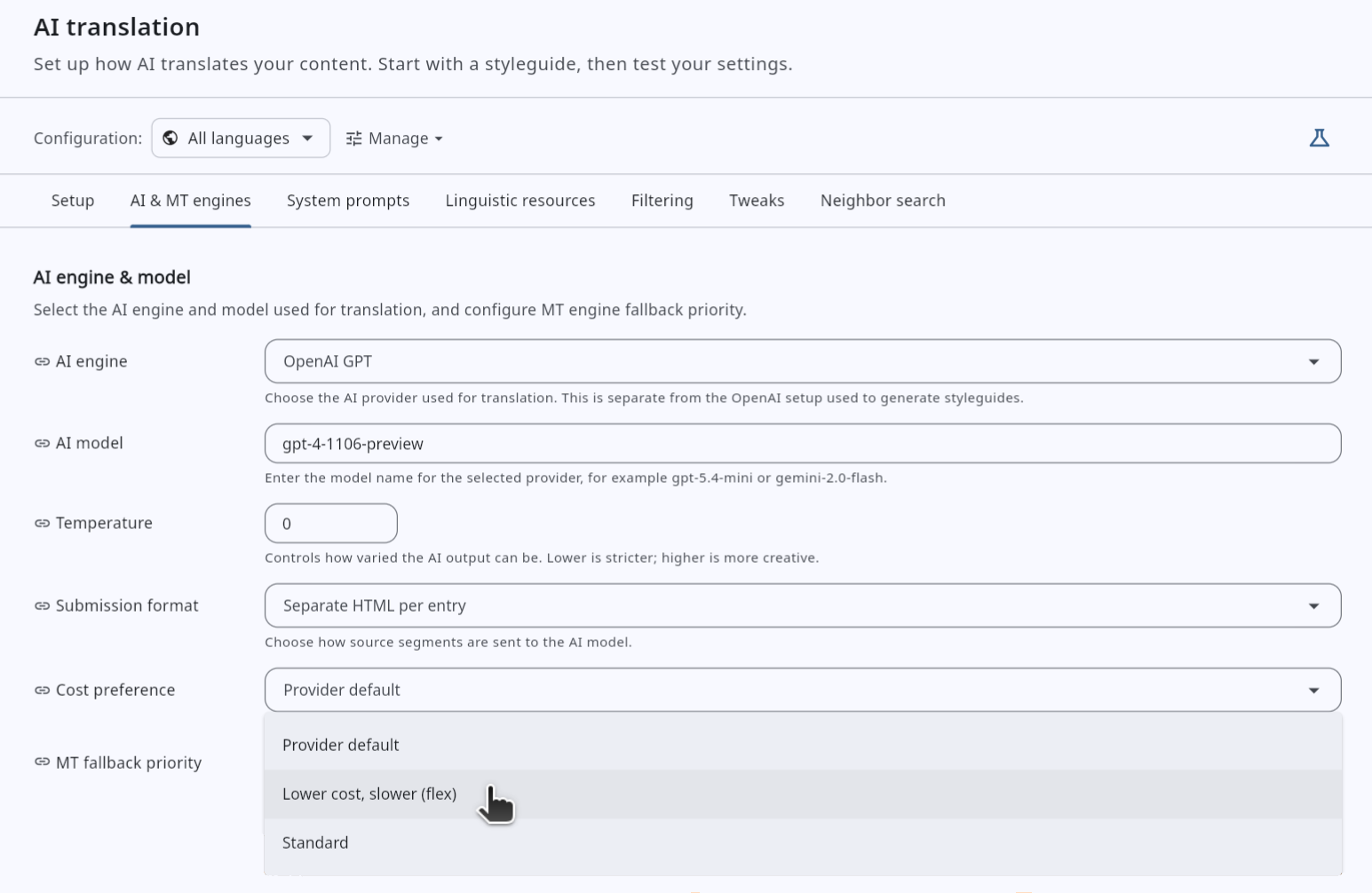
Most of us want high-quality AI translations for cheap. Up until recently, we had to make a trade-off between quality and cost. Luckily we’re not the only ones with such wishes, and OpenAI listened. They introduced Flex processing where the high-quality responses arrive slower, but cheaper. The best of both worlds!
This works very well for workflows that aren’t time-sensitive, like pre-translating a large site before passing the content on to reviewers. Such a process would run longer anyway, so a bit of extra time is unlikely to hurt.
To ensure we can work with well with Flex processing, the system handles errors, like timeouts or the service interruptions.
You can enable this feature on the Dashboard 3.0. Under AI translation ⟶ AI & MT engines, use the Cost preference dropdown.
Path prefix overrides
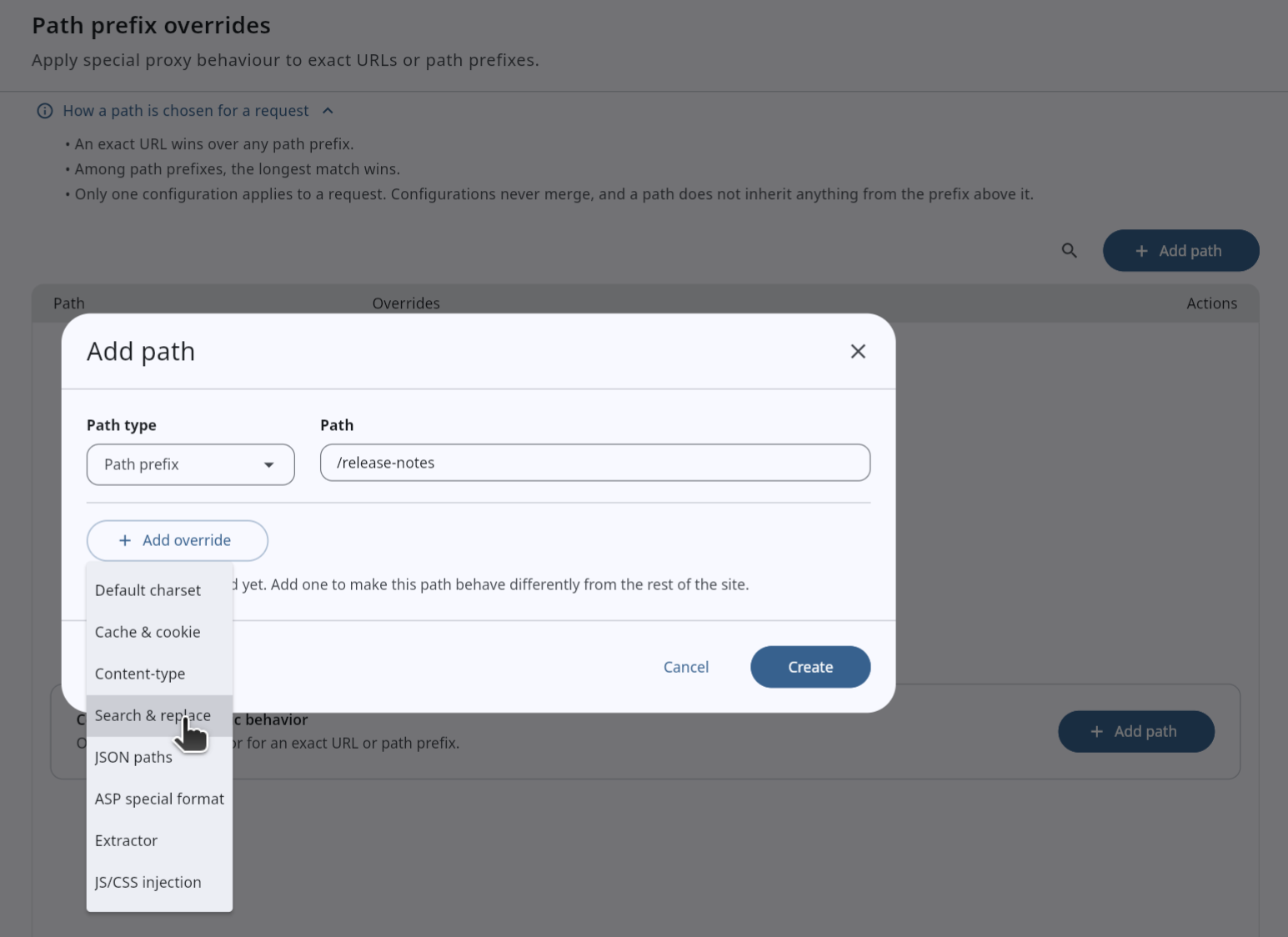
I use Path prefix overrides on almost every project to optimise the translated sites beyond what the original offers. PPOs allow me to set additional caching rules as appropriate for specific paths and path prefixes, improving loading times, or to adjust the content via search and replace. This is an invaluable tool in my box.
Unfortunately, the version on the Dashboard 2.0 has been pretty clunky. It used to require expertise in its use even to achieve basic stuff. Every time I used it, I felt like the Doctor must when they use their sonic screwdriver. Unless you know what you’re doing, it’s not recommended to mess with it. The new version we added to the Dashboard 3.0 is more like a basic multi-bit screwdriver. You may not know what every bit is for, but it’s a lot simpler to use the one you do need.
Even if you don’t fully move on to the Dashboard 3.0, I definitely recommend you manage Path prefix overrides from here. In the near future you can also expect fun new features surfacing here too.
Improved export defaults
With the JavaScript translation engine, an export is required to show the translations. We found that all of us just use the defaults of the Export section for this, mostly without thinking. This is the way we want it to be. To this end, we changed the defaults so that Skip excluded segments from export is now checked. This ensures that if you exclude content, that won’t stay translated on the site.
Miscellaneous
I’m certainly not surprised that we have lots of smaller improvements that don’t deserve their own paragraph. Are you?
- The New Workbench now keeps its filter settings in the URL, so they survive copy pasting and page refreshes.
- If the default filter hides all entries from the view (for example when they are all externalised), the New Workbench displays a short explanation that this is happening.
- AI suggestions in the New Workbench now use the entire entry (paragraph) instead of just the selected segment to improve quality through context.
- Entry tag, classes, path, and description are available as AI translation prompt template variables. They can be used as additional context to improve translation.
- The Team section got an Advanced mode that matches the features of Sharing settings on the Dashboard 2.0.
- Tabbed settings, like MT engines and JS/CSS injection under Path prefix overrides now open on the tab that has existing configurations saved.
- Cache overrides specified under Path prefix overrides are no longer applied on preview pages. These pages always show the latest content without caching, so that you can always quickly test your configuration.
- In the JavaScript translation engine, an AI attribute provenance marker no longer breaks the translation process.
- YAML files can now be downloaded just like all other formats.
- We fixed a bug where your choice of dark/light modes was not saved.
- Parts of the UI that didn’t have appropriate contrast in dark mode were adjusted.
- We fixed a bug that would crash the Dashboard 3.0 when displaying a Work package missing a target language.
- Glossary imports can now accept “do not translate” entries that have the translation field empty.
Ready to build your website localization infrastructure?
Book a free consultation with Easyling's solution experts. We'll review your website, your current setup, content volume and your goals. No generic demo. No sales deck. A real conversation about your project. Including a live translation preview of your own site.
Book a free consultation