Easyling release notes August, 2026
In August, we focused on improving the Dashboard 3.0, making it simpler to use and providing more information. Additionally, we worked on improving the speed of the JavaScript translation engine. We managed to take a good chunk off the startup speed of the translation script. This is most beneficial on lower-powered devices, like phones. Read the full article for all the details.
JS translation speed
The JavaScript translation engine runs in the visitors’ browser. As such, it needs to be particularly light. Every day, users are expecting faster and faster systems, but with current RAM pricing, devices aren’t replaced with faster ones as often anymore. So, we’re always working in the background to optimise.
This month, we managed to improve the startup time. The JS translation engine works by first having the untranslated content loaded, then applying the translation. This shows up as a flash of untranslated text. With our optimisation the duration of this flash is reduced.
To take advantage of this, please create a new JS export under the Export section of the Dashboard.
Previews in Explorer
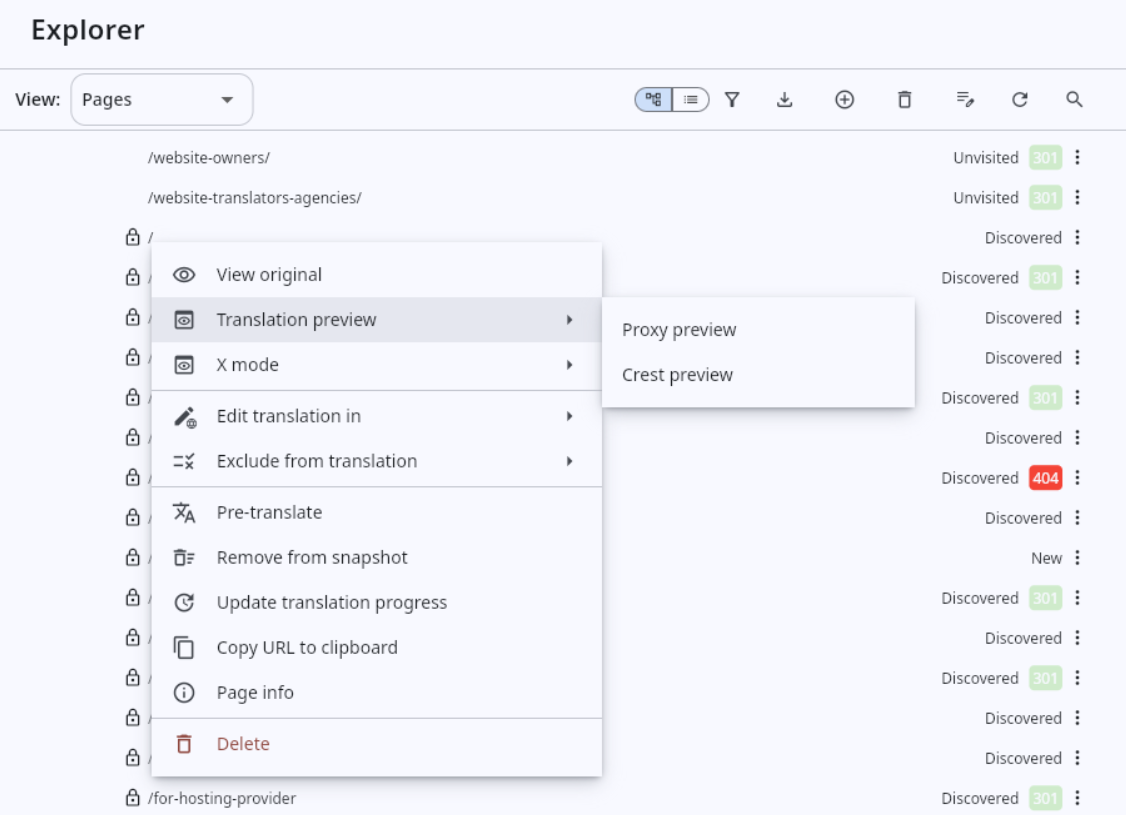
As Easyling has the two translation engines, Proxy mode and JavaScript mode, it needs different previews for each. Normally, a project only uses one and the Explorer is smart enough to show you the right one. However, on new projects, this may not be decided yet, so you may want to check both options and make an educated decision. In this scenario, the Explorer now shows both options.
Additionally, we surfaced the x-mode here as well. X-mode replaces content that the engine can translate with x-characters. This is useful when evaluating compatibility or investigating scenarios when a bit of the text is untranslated. The x-mode preview also handles Proxy and JavaScript modes just like with the regular preview.
Note that the Dashboard 3.0 is the only version where x-mode is available for the JS engine.
Handle preview errors
Related to the different preview modes, we noticed an issue. The new preview we built for the Dashboard 3.0 had a heading with a few options presented. To add this header, we put the preview in a frame.
We found that some websites don’t “want to” be embedded in this way. They may error out and show a popup about it. When this happens, the system now automatically goes into “fullscreen mode” where the heading is removed. As the site isn’t in a frame any more, it’s more likely to work as expected.
The benefit of this is that when there is an error in the preview, you can now be sure that it’s not caused by our frame as that frame isn’t present at that point any more.
Workbench
We’re aiming to make the New workbench much better than the old one. Step by step we build it up to delight. The examples from this month include:
- Search & Replace now offers the page the Workbench is open on, instead of the whole dictionary.
- We fixed a bug where upon switching a target language, the old language’s translations would stay present in the editor.
- Locked segments now stay locked and cleared translations save.
- Search, filters and counters now report what they actually match.
Miscellaneous upgrades
No set of release notes would be complete without this section. It’s also nice that I can mention so many of these smaller improvements this time.
- The Crawl wizard now filters out empty URLs that would happen if you pasted a list with empty lines.
- We added a warning to the Publish wizard about Azure Front Door. If you use origin-based SSL certificate renewal, it can fail once your translated site is published. This happens because with this setup, your domain starts pointing to Easyling, instead of your original server.
- The Explorer can now handle very old projects, where the index has not been migrated yet.
- There is now a warning in Advanced settings when the regular expression you enter under Pattern matching contains nested capture groups. This is crucial because such groups aren’t supported with the JS translation engine. We also added an option to edit the different regular expressions as one large expression.
- The Auto post-edit configuration now ensures that the settings are valid.
- We fixed a bug where further filtering an existing Work package, the languages you now select are included as opposed to those of the original package.
- If the target language selected in the Dashboard’s header is available in a given work package, it is now opened as the default.
- The Preserve whitespace button now shows whether the mode is on.
- We fixed a bug where
*could be saved as the language of a Page content override. It now means “all languages”.
Ready to build your website localization infrastructure?
Book a free consultation with Easyling's solution experts. We'll review your website, your current setup, content volume and your goals. No generic demo. No sales deck. A real conversation about your project. Including a live translation preview of your own site.
Book a free consultation